
How to Register for SUUSI
Click on our friendly red button to begin the registration process (this button will only appear while Registration is open, so you won’t see it until April 15 at 6pm).

This will take you to solis.suusi.org, our online registration tool. If you aren’t already logged in, you’ll be prompted to. If you don’t have an account yet, you’ll be prompted to set one up. Then you’ll be taken to the page where you can begin registering for this year’s SUUSI!
If you need a coupon code to provide a discount for a SUUSI newbie (or someone who hasn’t attended since 2019), you can generate a code here.

On the main Registration page, you’ll be asked to input or review the personal information for the primary individual on your account first. Note that SUUSI does ask for your full legal name. For those who are transitioning, we recognize that sharing this information may be upsetting and would like to ensure that it will only be used by staff for legal verification purposes (primarily background checks for staff). It’s to comply with our rules, Radford’s rules and to keep everyone (especially children) safe. Participants may choose what names will appear on name tags, the Mugbook, and all public SUUSI spaces.
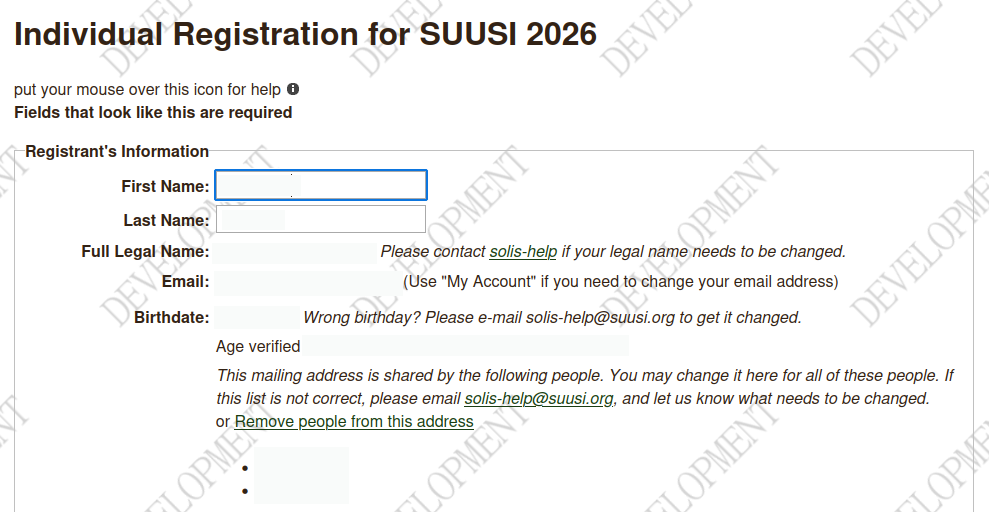
You will need to provide an email address and phone number. Email is our primary way of communicating with you, so if you need help, you’ll get it fastest by email, and you’ll receive automatic event updates at SUUSI from SOLIS via email. You can also choose whether or not to receive text messages: we only send these at SUUSI as important updates that are especially time-sensitive.
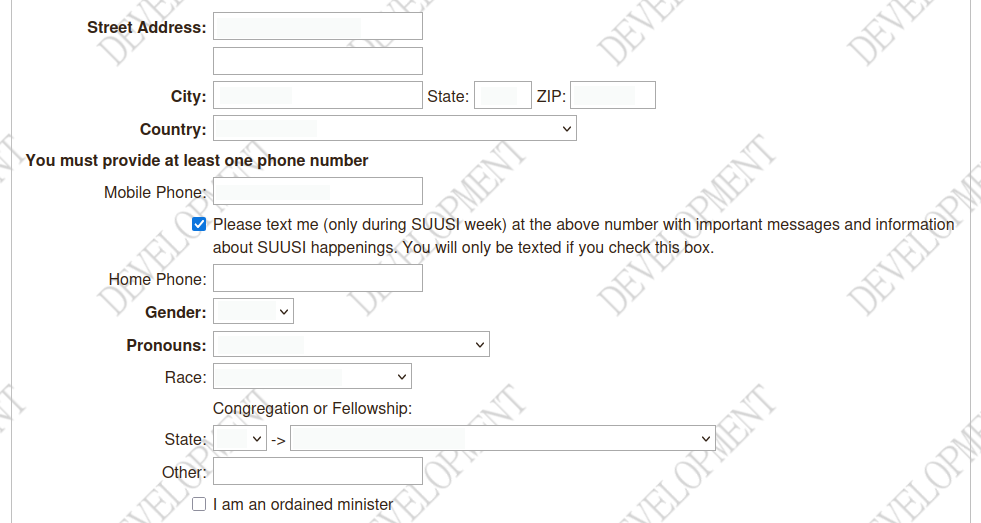
There are a lot of optional fields that help us collect demographic information (which SUUSI never sells or shares for non-SUUSI purposes). All required fields are marked in bold type.

Housing Options is an area with some new choices this year. You can choose an option from the drop-down menu, or choose a custom group of your own. Some options are only available to certain age groups.
- Adult dorm: This choice will place you in a dorm with other adults, without a themed housing group.
- Family dorm (no co-op): This is the option for families rooming with children 0-17 who don’t want to stay in the co-op dorm. Maybe you have an early bedtime yourself, or you brought a grandparent to watch the kids. Please note the rules of supervision at SUUSI:
- During the day, older children and Middlers may be in a set location, such as a dorm lounge, if there are regular checks from a responsible adult. However, parents may not go out (or go to bed) and leave kids in a lounge.
- Children with check‐out privileges may go directly from Youth/Middler programming to an agreed‐on location to meet their parents/guardians.
- Parents can (and do!) informally share care among themselves, as long as every child knows which adult is supervising them and every adult knows who has their kids.
- Youth and Middlers have a curfew from 9:30 PM to 6 AM, during which they must either be in their dorm room or with their own parent/guardian.
- Child care co-op dorm: The childcare co‐op dorm allows parents and guardians to supervise other families’ sleeping children so that more folks can enjoy evening activities. Each adult in your room will sign up for one 2.25‐hour shift of co‐op duty. During your shift, you’ll sit in the hall with a clipboard and cell phone or be a “runner” available to find parents as needed. If young kids wake up, you’ll call their adult. If older kids try to wander the halls, you’ll send them back to bed. Not on duty? Once your kids are settled, head out to enjoy the night (until 1:15AM (2:15 Friday) when an adult must be in after the co‐op ends)! We’ll call if your child needs you. All participants on duty must be sober and have completed criminal background and National Sex Offender Registry checks, as well as training and a brief meeting. Email for more information.
- Teen dorm: For teens 14-17 who want to live together. Programming information here.
- Young Adult dorm: For adults ages 18-25 who want to live together in an alcohol-free space. More information here.
- Median dorm: Medians is a housing group for adults ages 21 and up. It is primarily made up of those ages 25-35, blending younger adults with those slightly further along in life. However, adults over 35 are also welcome to join. Medians serves as a transitional community between the Young Adults and the broader Adult housing groups, offering a welcoming space that bridges the two. Please note that the Medians housing group is intended for adults only—children and families are not permitted to stay in this area.
- Nature Staff dorm: Although this choice is primarily for those working on Nature staff, it’s also an option for those who want to live in that environment and with that community. Note that it doesn’t come with any special privileges.
- Meeple People: Choose this housing group to meet others who also enjoy playing board games, card game, and tabletop RPGs. Bonus: we are assigned the dorm rooms closest to Pair-a-Dice.
- Artisan Alley: A welcoming hall group for people who enjoy creativity, connection, and spending time together in a relaxed, supportive environment. Whether you love making art, crafting, or simply being around creative energy, this group offers a space to gather, share ideas, and get to know one another. The culture is informal, collaborative, and open to all, no experience required. Bring your works in progress if you’d like, or simply bring yourself and enjoy the creative spirit and camaraderie of the group.
- Custom choice: If you and some family or friends want to be placed in rooms near each other, simply come up with a name that all of your group input into the field here. (Dorm placement is all done by humans, so exact spelling shouldn’t matter as long as the intent is clear.)
When you get all the way to the “Save Changes” button, you’ve made it through the first page! Congratulations!
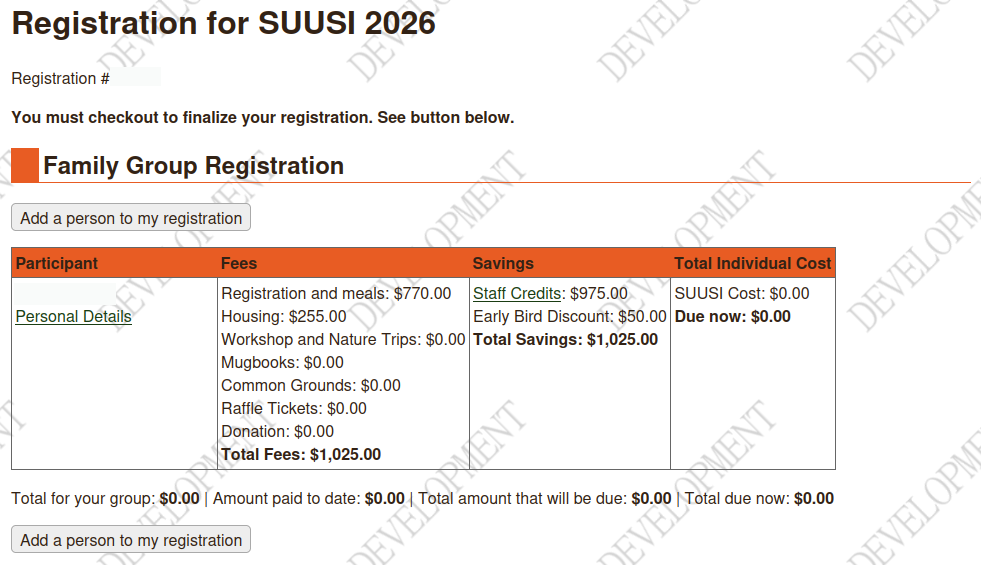
If you have more than one person in your registration group, this is where you will add them. If you need to change any of your own information, click on the “Personal Details” link.

Now we get to the fun part. Click on “Sign up for Volunteer Jobs, Workshops, and Trips Using a Calendar.” This will take you back to the main SUUSI.org site, where you will be able to navigate to events, search the catalog, and put everything you want to do on your calendar. Whenever you come to a set of catalog boxes, you can click on one for more information. Since you are logged in, you can sign up for workshops and trips. Simply click the “Sign Up” button, mark who in your group is signing up, and click “Sign Up” again to confirm. Any fees associated with that event will be added to your registration in SOLIS.
(If the SUUSI.org catalog view is not working for you, or if you prefer the old SOLIS signup, that option is still currently available.)
You can also add public admission events to your calendar with the “Add to Calendar” button, or check potential conflicts with the “Preview on Calendar” button. If an event is full, you can click the “Start Watching” button to be notified if space opens up.
When you have added all the Workshops, Nature Trips, Volunteer Jobs, and other events you want, simply click the friendly red “REGISTER” button again to be taken back to SOLIS to check out. You can always add more later, but if you add them after registration closes (for example, during SUUSI) and they have fees associated with them, you’ll need to pay within an hour in order to hold those slots.
Checking Out
Okay, we realize that the checkout process can seem endless. There are a lot of bits of information to confirm and fill in. Make yourself a cup of tea, because this might take a little while (and yes, it’s probably already taken you quite a while already; but SUUSI is worth it!). We promise that it’s all important. We wouldn’t include it if it weren’t. When you finally make it to “Proceed to Payment,” you’ll know you’re almost done.
Choose your payment amount and how you’ll be paying. Make sure that any discounts are applied (and that you know when and if they’ll expire). It’s much faster to complete registration at SUUSI if you have prepaid, even if you do it with your phone on the road to Radford.
Still Have Questions? We’d love to hear from you.
- Newcomers: newcomers@suusi.org
- General Questions: info@suusi.org
- Registration Help: registration@suusi.org
- SOLIS and tech questions: solis-help@suusi.org